
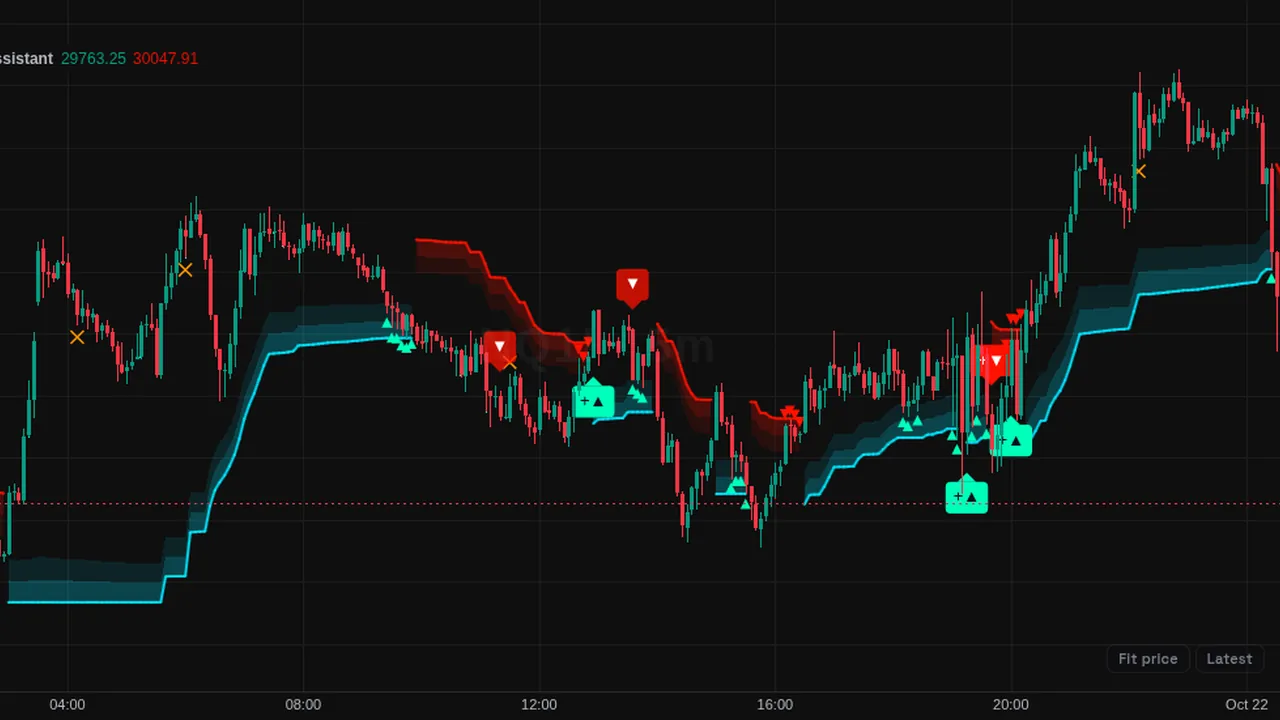
Trend signal suite: bullish and bearish signals, fair value trail, optional trend tools, target and stop levels, and component tables.
Overview
This community script prints bullish and bearish signal labels, with stronger versions when more parts agree, plus exit signals and optimal entry markers. A fair value trail cloud follows price and changes color with the trend.
Optional parts include a trend spine, a trend bias band, cloud layers, a trend-range classifier that marks ranging candles, target and stop levels, candle coloring, a component table that shows the state of each tool, and a performance table.
How it works
The signal engine has two modes: Swing, which looks at price stability and volatility for longer trends, and Scalping, a faster system that adapts its settings to market state. Signals can be trend-following or reversal. Time horizon settings set short, medium or long lengths for each tool.
An optional optimizer tests eight lengths on past bars and uses the one that scored highest under the chosen measure. Target and stop distances use volatility multiples (2.0 and 1.5 by default) or fixed percentages, with up to three targets.
A custom alert sequence lets you chain several events into one alert.
How to use it
- Use the fair value trail to see the trend state at a glance.
- Some traders wait for a signal to agree with the trend bias and classifier before paying attention to it.
- Use the component table to see which parts agree right now.
- Use the performance table to review how the signals behaved on past bars under its rules.
These are ways some traders read it, for learning. They are not trade signals.
Settings
| Setting | Default |
|---|---|
| Master Dashboard | |
| Smart Signals | On |
| Fair Value Trail | On |
| Trend Spine | Off |
| Trend Bias | Off |
| Firmament Clouds | Off |
| Trend-Range Classifier | Off |
| Stop-Loss Level | Off |
| Exit Signals | On |
| Optimal Entry Signals | On |
| Component Table | On |
| Smart Signals | |
Show all 67 settings
| Setting | Default |
|---|---|
| Smart Signals ModeOptions: Swing, Scalping | Swing |
| Signal ModeOptions: Trend, Reversal | Trend |
| Time HorizonOptions: H_SHORT, H_MEDIUM, H_LONG | H_MEDIUM |
| Smart Signals Optimization Engine | |
| Auto-Optimize Length | Off |
| Minimum Trades | 5 |
| Show Performance Table | Off |
| Performance Table PositionOptions: P_TR, P_TC, P_TL, P_MR, P_MC, P_ML, P_BR, P_BC… | P_TR |
| Fair Value Trail | |
| Time HorizonOptions: H_SHORT, H_MEDIUM, H_LONG | H_MEDIUM |
| Trail Width | 1.0 |
| Trend Spine | |
| Time HorizonOptions: H_SHORT, H_MEDIUM, H_LONG | H_MEDIUM |
| Trend Bias | |
| Time HorizonOptions: H_SHORT, H_MEDIUM, H_LONG | H_MEDIUM |
| Firmament Clouds | |
| Time HorizonOptions: H_SHORT, H_MEDIUM, H_LONG | H_MEDIUM |
| Trend-Range Classifier | |
| Classification HorizonOptions: H_SHORT, H_MEDIUM, H_LONG | H_MEDIUM |
| Classification Memory | 200 |
| Take-Profit / Stop-Loss | |
| TP/SL Distance ModeOptions: Volatility, Percentage | Volatility |
| TP Multiplier | 2.0 |
| SL Multiplier | 1.5 |
| TP Distance % | 1.0 |
| SL Distance % | 0.75 |
| Appearance | |
| Candle ColoringOptions: Trend, Trend Gradient, Volume Gradient, None | Trend |
| Detect Ranging Candles | On |
| Bullish | #00ffbb |
| Bearish | #ff1100 |
| Neutral | #787b86 |
| Exit Signals | #ff9800 |
| Historical Alerts | #ffd600 |
| Component Table | |
| Table PositionOptions: P_TR, P_TC, P_TL, P_MR, P_MC, P_ML, P_BR, P_BC… | P_BR |
| Table SizeOptions: Tiny, Small, Normal, Large, Huge | Small |
| Alerts | |
| Show Historical Alerts | Off |
| Alert FrequencyOptions: Once Per Bar, Once Per Bar Close, All | Once Per Bar Close |
| Custom Alert Message | Smart Signals Alert: {{event}} | {{ticker}} ({{interval}}) @ |
| Max Bars Between Steps | 50 |
| Enable Universal Alerts | Off |
| Alert Sequence | |
| Step 1Options: C_NONE, T01, T02, T03, T04, T05, T06, T07… | C_NONE |
| LogicOptions: AND, OR | AND |
| Step 2Options: C_NONE, T01, T02, T03, T04, T05, T06, T07… | C_NONE |
| LogicOptions: AND, OR | AND |
| Step 3Options: C_NONE, T01, T02, T03, T04, T05, T06, T07… | C_NONE |
| LogicOptions: AND, OR | AND |
| Step 4Options: C_NONE, T01, T02, T03, T04, T05, T06, T07… | C_NONE |
| LogicOptions: AND, OR | AND |
| Step 5Options: C_NONE, T01, T02, T03, T04, T05, T06, T07… | C_NONE |
| LogicOptions: AND, OR | AND |
| Step 6Options: C_NONE, T01, T02, T03, T04, T05, T06, T07… | C_NONE |
| LogicOptions: AND, OR | AND |
| Step 7Options: C_NONE, T01, T02, T03, T04, T05, T06, T07… | C_NONE |
| LogicOptions: AND, OR | AND |
| Alert State Filters | |
| State Filter 1Options: C_NONE, S01, S02, S03, S04, S05, S06, S07… | C_NONE |
| State Filter 2Options: C_NONE, S01, S02, S03, S04, S05, S06, S07… | C_NONE |
| State Filter 3Options: C_NONE, S01, S02, S03, S04, S05, S06, S07… | C_NONE |
| State Filter 4Options: C_NONE, S01, S02, S03, S04, S05, S06, S07… | C_NONE |
| State Filter 5Options: C_NONE, S01, S02, S03, S04, S05, S06, S07… | C_NONE |
| External Sources | |
| External Source 1 | close |
| External Source 2 | close |
| External Source 3 | close |
| External Source 4 | close |
| External Source 5 | close |
Alerts
Members can create an alert on its conditions (for example "Smart Signals Bullish Signal", "Smart Signals Bearish Signal", "Fair Value Trail Turns Bullish", "Stop-Loss Hit") from the chart's alert dialog; alerts from indicators run while ZoroCharts is open in the browser.
Notes and limits
- Past results in the tables describe history on this chart only.
- The optimizer chooses settings from past data, so its choice can change over time.
- Many tools are off by default; turn them on as needed.
Education only. Not financial advice. Indicators mark what happened on the chart; they do not predict what price will do. Trading futures, forex, crypto and other markets carries a high level of risk and may not be suitable for everyone.