
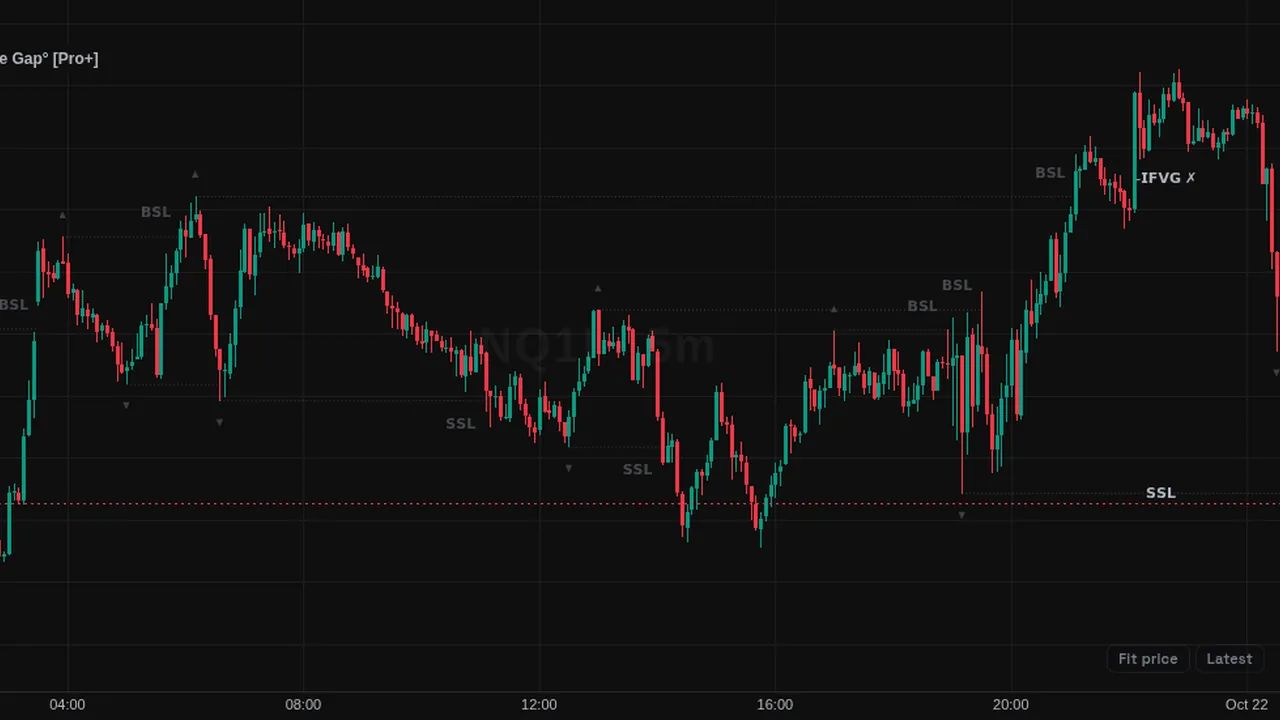
Inverse fair value gap setups after liquidity sweeps, with target lines, invalidation, ghost boxes and a small dashboard.
Overview
This community script marks inverse fair value gaps (IFVGs). It watches for a fair value gap that price later closes through, which turns the gap into a zone on the other side. Confirmed IFVGs are drawn as boxes in bullish or bearish colors, with optional midpoint (CE) lines and dotted target lines.
It can also draw sweep lines when swing liquidity is taken, ghost boxes for potential IFVGs, and gray boxes for invalidated setups. A dashboard at the bottom of the chart summarizes the setups.
How it works
Swings are found on a liquidity timeframe (15 minutes by default) with a swing lookback of 15. By default an IFVG only counts if a liquidity sweep came first, and the inversion must happen within a valid window of 8 bars.
Raw gaps expire after 80 bars if they never invert. A setup is invalidated on a close (or a wick, if set) through the zone. Optional filters limit setups to one or two session windows, to the first and last 10 minutes of each hour, or to gaps that agree with a higher-timeframe FVG.
Up to 15 active setups stay on the chart.
How to use it
- Use the boxes to see where a gap has flipped from one side to the other.
- Some traders wait for a sweep, then look for the first IFVG as a sign of a change in direction.
- Watch the target lines to see where the script projects the move to.
- Use the session filter to study only the hours you trade.
These are ways some traders read it, for learning. They are not trade signals.
Settings
| Setting | Default |
|---|---|
| ALERTS SETTINGS | |
| Alert on IFVG Inversion? | On |
| Alert on Target Hit? | On |
| Alert on Invalidated? | Off |
| Alert on Liquidity Sweep? | Off |
| GENERAL SETTINGS | |
| Max Active Setups | 15 |
| Show Invalidated Setups | Off |
| BiasOptions: Neutral, Bullish, Bearish | Neutral |
| FVG Minimum ThresholdOptions: All, Ticks, Percent (ATR) | All |
| SESSION FILTERS | |
| Enable Session Filter? | Off |
Show all 40 settings
| Setting | Default |
|---|---|
| Timezone | UTC-4 |
| Enable 2nd Session? | Off |
| Macros Only (First/Last 10m) | Off |
| MODEL & LIQUIDITY SETTINGS | |
| Liquidity Timeframe | 15 |
| Swing Lookback | 15 |
| HTF FVG Filter? | Off |
| Require Liquidity Sweep? | On |
| Valid Window | 8 |
| Invalidation ModeOptions: Close, Swing | Close |
| Max Swings Tracked | 8 |
| Raw FVG Expiry (bars) | 80 |
| DISPLAY & STYLING | |
| Global Label SizeOptions: Tiny, Small, Normal | Small |
| Sweep Lines | On |
| Markers | On |
| Potential IFVG (Ghost) | On |
| Show IFVG Boxes | On |
| Extend Active Boxes | Off |
| Box Border Width | 0 |
| Bullish (+IFVG) | color.new(#2962FF, 0) |
| Transp. | 85 |
| Bearish (-IFVG) | color.new(#FF5252, 0) |
| Invalid Color | color.new(#787B86, 0) |
| Transp. | 90 |
| Show Midpoint (CE) | Off |
| TARGET PROJECTIONS | |
| Show Target Lines | On |
| StyleOptions: Dotted, Dashed, Solid | Dotted |
| Stop Exactly at Hit | On |
| DASHBOARD TABLE | |
| Show Dashboard? | On |
| LocationOptions: Bottom Left, Bottom Center, Bottom Right, Top Right | Bottom Center |
| Text SizeOptions: Tiny, Small, Normal | Tiny |
| Background Transp. | 100 |
Alerts
Members can create an alert on its conditions (for example "+IFVG Inversion Confirmed", "-IFVG Inversion Confirmed", "IFVG Target Hit", "Buyside Liquidity (BSL) Swept") from the chart's alert dialog; alerts from indicators run while ZoroCharts is open in the browser.
Notes and limits
- Times use the timezone setting (UTC-4 by default).
- Targets and invalidation follow the script's own rules.
- It works on any symbol with intraday data.
Education only. Not financial advice. Indicators mark what happened on the chart; they do not predict what price will do. Trading futures, forex, crypto and other markets carries a high level of risk and may not be suitable for everyone.